
Discontinued INNCOM Modules and Their Current Replacements
If you run an older INNCOM guest room management system, you have almost certainly opened a device closet, pulled a failed module, read the part number off the label — and then discovered the number no longer appears on any current price list. That moment is where a lot of hotel engineering headaches begin, and it is exactly what this guide is meant to shorten.
INNCOM (now part of Honeywell's hospitality portfolio) has been installed in hotels for decades. Systems that were leading-edge at commissioning are now several product generations behind. Modules get discontinued, wiring conventions evolve, and the successor part on the shelf is rarely a drop-in twin of the one that failed. The good news: in almost every case there is a clean path forward. The job is choosing the right one before you spend money.
This is a planning guide, not a parts catalogue. We keep specifics general on purpose — the authoritative cross-reference for any given module lives in your INNCOM documentation or comes from an Authorized Service Integrator (ASI) who can confirm it against your actual installed generation.
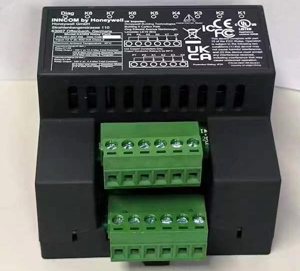
How to Tell if a Module is EOL or Discontinued
"End of life" (EOL) and "discontinued" are not always the same thing, and the distinction matters for planning:
- Discontinued usually means the manufacturer has stopped producing or selling that part number. It may still be supportable and repairable, and stock may exist in the channel.
- End of life (EOL) typically means the product family is being wound down entirely — production has ended, and support, firmware, and spare-parts availability are all sunsetting on a timeline.
A few practical signals that you are looking at legacy hardware:
- The part number no longer appears on current INNCOM/Honeywell price lists or ordering portals.
- Your integrator or distributor quotes long lead times, "last-time-buy" language, or offers a different part number in response to your request.
- The device firmware or the system generation it belongs to (for example, an older controller platform paired with an older room network) is no longer receiving updates.
- Physical clues: aged label formats, discontinued housing styles, or connector types that differ from anything currently shipping.
If any of these apply, treat the module as legacy and plan accordingly rather than assuming a like-for-like reorder will be available next time.
The Four Paths When a Module is Discontinued
When a legacy INNCOM module fails or needs expansion, you generally have four options. They are not ranked — the right one depends on how critical the device is, how many you have, and where the wider system sits in its lifecycle.
1. Repair
Some modules can be repaired or bench-serviced rather than replaced. This is often the fastest and lowest-cost route for a one-off failure in an otherwise healthy system, and it avoids introducing a new hardware generation into a stable install. Repair is best when the device is genuinely serviceable and you are not fighting a broader wave of age-related failures across the property.
2. Refurbished or Used Direct Match
A refurbished or tested-used unit of the exact legacy part number keeps everything electrically and mechanically identical — same harness, same behaviour, same commissioning. For discontinued-but-not-obsolete modules this is frequently the cleanest fix, because there is nothing new to verify. The catch is supply: direct-match legacy stock is finite, so it is a good tactic for keeping a system running while you plan a longer-term transition, not a permanent supply strategy.
3. Cross-Reference to a Current Replacement
Here you swap the discontinued module for its modern successor. This is where compatibility verification becomes essential (see below), because the successor may differ in wiring, addressing, firmware, or form factor. Done correctly, it brings you onto a currently-supported part while leaving the rest of the system in place. Done blindly, it produces a device that physically mounts but will not talk to your network.
4. Phased Upgrade
If a property has many aging modules, repeated failures, or a system generation that is broadly EOL, replacing one part at a time can be false economy. A phased upgrade migrates rooms or zones onto a current platform in planned stages — floor by floor, wing by wing, or during scheduled renovations — so you spread cost and disruption while steadily retiring legacy hardware. This is a project, not a parts order, and benefits most from ASI involvement up front.
Common Discontinued Families and the Kind of Successor They Map To
The following is a general orientation only. It is not a cross-reference table — your exact successor depends on your installed generation and must be confirmed against INNCOM documentation or with an ASI before ordering.
Older room controllers (X-series and earlier controller platforms)
Legacy INNCOM room controllers from earlier platform generations broadly map to current-generation guest room controllers. The successor performs the same core role — occupancy logic, HVAC control, integration with the room network — but the platform, addressing scheme, and firmware environment have moved on. This is a family where "same job, different device" is the rule, and verification is non-negotiable.
Older switches, decor stations, and thermostats
Earlier INNCOM in-room control points — wall switches, decor/keypad stations, and older thermostat modules such as legacy E5-series devices — generally map forward to Honeywell INNCOM's current switch and control offerings: Evora (tactile keypads on standard mounting) or MODEVA (the premium capacitive-touch line). Which one fits is a design and budget decision, not a fixed succession — both are current, parallel lines. Either way, these are a newer generation with their own wiring and network expectations, so they are rarely a wire-for-wire swap onto a much older room bus.
Relay packs and power/load modules
Legacy relay packs and load-control modules map to current relay and power modules that fill the same function. Because these carry real loads (HVAC, lighting, drapes), matching current rating, contact configuration, and control interface to the existing wiring is critical — the "close enough" trap is especially expensive here.
Why Compatibility Verification Matters Before You Order
The single most common — and costly — mistake is ordering a successor part number on the assumption that it will drop straight into the old socket. Across INNCOM generations, several things quietly change:
- Harnesses and connectors differ between generations. A modern module may not mate with a legacy loom without an adapter or rewire.
- Addressing and network conventions evolve, so a new device may need reconfiguration — or a compatible network layer — to be seen by the system.
- Firmware and platform expectations differ; a current controller may assume a current room network around it.
- Form factor and mounting can change, affecting back-boxes, plates, and decor.
Verifying compatibility before the purchase order turns a potential returns-and-downtime cycle into a single correct install. It answers the real question — "will this specific successor work in this room, on this generation of system?" — which a catalogue lookup alone cannot.
How Howe Sound Solutions Sources Parts in Canada
Howe Sound Solutions is a Canadian Honeywell INNCOM Authorized Service Integrator, and we deliberately run a quote-first, compatibility-checked process rather than shipping a part against a bare number.
When you send us a failed part number, room details, and where practical a photo of the label and wiring, we work back to your installed system generation, identify whether repair, refurbished direct-match, cross-reference, or a phased upgrade is the smarter path, and confirm what the successor actually needs to integrate cleanly. Sourcing is handled within Canada, which keeps lead times, freight, and cross-border customs friction down for Canadian properties. You get a quote that reflects a verified fit — not a guess — so the part that arrives is the part that works.
Frequently Asked Questions
1. How do I know if my INNCOM module is actually discontinued or just hard to find? The clearest signals are that the part number no longer appears on current price lists, and that quotes come back with long lead times, "last-time-buy" wording, or a different suggested part number. When in doubt, send the number to an ASI who can check it against the current catalogue and your system generation.
2. Can I just buy the modern replacement and swap it in myself? Sometimes, but not safely by assumption. Successor modules often differ in wiring, addressing, or firmware from the legacy part. Verify compatibility for your specific system generation before ordering, or you risk a device that mounts but never communicates.
3. Is a refurbished original better than a new replacement? It depends on your goal. A refurbished exact-match keeps everything identical and is ideal for keeping a stable system running with no new variables. A current replacement moves you onto a supported platform. For aging systems with repeat failures, a current or phased approach usually wins long-term.
4. What is the Evora line, and does it replace all my old INNCOM parts? Evora is Honeywell INNCOM's current guest-room controls family and is the successor for many legacy in-room touchpoints such as older switches, stations, and thermostats. It does not map one-to-one to every legacy part, and it is a newer generation — so treat it as the target platform to verify against, not a universal drop-in.
5. Do I need to replace my whole system if a few modules are EOL? Usually not immediately. A few EOL modules can often be handled with repair or direct-match refurbished units. A full or phased upgrade only becomes the better economic choice when failures cluster, the broader system generation is sunsetting, or you are already renovating.
Talk to an ASI Before You Order
If you have a legacy INNCOM part number in hand and you are not certain what it maps to, that is the moment to get a compatibility-checked quote rather than a best guess. Send Howe Sound Solutions the failed part number, the room and system details, and a photo of the label where you can — we will confirm the right path, source it in Canada, and quote you a fit that is verified before anything ships.
This guide is general planning information. Exact module cross-references depend on your installed system generation and should always be confirmed against your INNCOM documentation or with an Authorized Service Integrator.
Related: INNCOM product lines explained · e7 vs e528 comparison · INNCOM parts in Canada · parts catalogue · customer platform · contact us