
INNCOM PIR Occupancy Sensor Problems: Guest Complaints, Drift, and Fixes
If your front desk keeps logging the same complaint — "the air conditioning shut off in the middle of the night" or "the room got warm while I was reading" — the occupancy sensor is usually the first thing engineering gets blamed for. Sometimes that is fair. Just as often, the sensor is doing exactly what it was told to do, and the real issue is placement, a stuck contact, or a timeout that was tuned for a different room.
This guide is for hotel maintenance and engineering staff running INNCOM guestroom controls. It explains, in plain language, how the system decides whether a room is occupied, what drives the most common complaints, and how to sort a quick tuning fix from a genuine hardware failure that needs an INNCOM-authorized service integrator (ASI). We keep the concepts general on purpose. For exact key sequences, menu paths, and property-specific settings, always defer to your INNCOM documentation or an ASI.
How INNCOM Occupancy Detection Actually Works
The single most useful thing to understand is this: INNCOM does not decide a room is empty from motion alone.
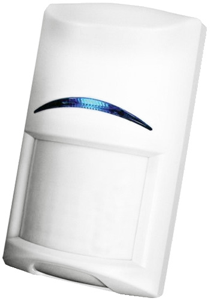
A passive infrared (PIR) sensor sees changes in heat across its field of view. A person walking past is easy to detect. A person lying still under a duvet, or sitting quietly at a desk, produces very little of the moving heat signature a PIR relies on. If the system trusted the PIR by itself, every guest who fell asleep would eventually read as "gone," and the room would drift back toward its unrented setpoint.
INNCOM avoids that by combining sensors and logic rather than reacting to a single input:
- The PIR provides live evidence that someone is moving in the room right now.
- The door contact (and often a window contact) tells the system when the entry door has opened and closed — the signature of someone leaving or arriving.
- A retrigger timer keeps the room "occupied" for a set period after the last detected motion, so brief stillness does not empty the room.
Put together, the controller reasons more like a person would. If the door opened, closed, and then no motion followed for a long time, the room is probably empty. But if the door has not opened since the guest checked in, the system should assume they are still there even when the PIR sees nothing — because there is no evidence they ever left. This door-plus-motion logic is the heart of the design, and most "phantom vacancy" complaints trace back to one half of it not working.
Occupied, Unoccupied, and Unrented
It also helps to separate two ideas that guests blur together. A room can be unrented (no guest assigned; deep setback allowed to save energy) or rented but temporarily unoccupied (guest is out for dinner; a gentler setback applies). The comfort range a guest experiences depends on which state the controller believes it is in. When a guest says "it never gets comfortable," the controller may have the room in the wrong state entirely.
The Complaints You Actually Hear
"The AC shut off while I was still in the room"
The classic. The guest was asleep or sitting still, the PIR saw no motion, the retrigger timer expired, and the room began drifting toward setback. Almost always this is a placement or timeout problem, not a broken sensor — the PIR is working, it just cannot see the part of the room where the guest is stationary.
"The room never stays comfortable"
Here the complaint is drift, not a hard shutoff. The room reaches setpoint, then creeps back over an hour or two. This points to the room repeatedly falling out of the occupied state — a marginal PIR sightline, an aggressive timeout, or a door/state issue confusing the controller about whether anyone is home.
"The sensor is spying on me"
A perception complaint, but worth taking seriously because it affects reviews. A PIR detects heat and movement; it does not record images, audio, or identity, and it is not a camera. Front-desk and engineering staff should be equipped to explain, calmly and accurately, that the device only senses whether the room is in use so comfort and energy settings can follow the guest.
Root Causes Worth Checking First
Placement and sightlines. A PIR only protects what it can see. If the sensor's view of the bed or the primary seating area is blocked by an open closet door, a tall wardrobe, drapery, or an architectural nook, a still guest disappears from its field of view. Rooms that were re-furnished after commissioning are prime suspects.
Blocked or dirty lens. Dust film, a smudge, tape or a sticker left by a previous guest, or a decorative item set in front of the sensor all reduce sensitivity. This is the cheapest thing to rule out and it is often the answer.
A stuck door contact. This one is sneaky. If the door reed switch or its magnet is misaligned, damaged, or the magnet has drifted, the controller may never register that the door opened when the guest left — so the room reads occupied when it is empty (wasting energy), or the state logic gets confused and the room reads empty when it is not. A door contact that is stuck "closed" removes half the occupancy logic. Suspect it whenever motion and door behavior disagree.
Timeout tuning. The retrigger/occupancy timeout is a setting, not a fixed law of physics. A value that works for a business room may be too short for a resort suite where guests spend long stretches reading or sleeping. Tuning is legitimately an ASI task on most properties, because the values interact with energy-management targets and central reporting.
Testing a Sensor in the Field
INNCOM controllers such as the e7 include a service or commissioning mode with built-in self-tests — a PIR motion test, a door-sensor test, and related checks — so you can confirm each input independently instead of guessing from guest behavior. Conceptually the workflow is:
1. Walk test the PIR. Enter the controller's service/test mode and move through the room, especially across the bed and seating areas, watching for the device to register detection. Then stand still where a guest would and confirm whether it still sees you. This is how you find blind spots.
2. Cycle the door contact. With the door test active, open and close the entry door and confirm the controller registers both states cleanly. A contact that does not toggle reliably is your culprit for phantom occupancy or phantom vacancy.
3. Check window contacts the same way if the room has them, since an open-window state can also gate HVAC behavior.
We are describing these tests conceptually. The exact button presses, menu entry sequence, and on-screen indicators vary by controller and firmware — look them up in your INNCOM documentation or ask your ASI rather than improvising, and never change energy-management values in the field without authorization.
Placement Best Practices
- Give the PIR a clear, unobstructed line to the bed and the main seating area — the two places a guest stays still longest.
- Keep the lens clean and clear; add lens checks to your room preventive-maintenance rounds.
- Re-verify sightlines after any furniture change, renovation, or room-type reconfiguration.
- Confirm door and window magnets are aligned and undamaged whenever you service door hardware — HVAC occupancy quietly depends on them.
- Treat unusually frequent comfort complaints in one specific room as a commissioning problem to investigate, not a guest to placate one night at a time.
Tuning Issue or Real Defect?
Likely a tuning or placement issue (fixable without replacing hardware): the PIR clearly detects motion in service mode but the room still drifts; the complaint is concentrated in rooms with a particular layout; adjusting the timeout or clearing a sightline resolves it. Timeout changes themselves should go through an ASI because they touch energy-management logic.
Likely a real defect (escalate): the PIR fails to register a walk test at all; the door contact will not toggle after you have confirmed alignment; the controller reports a device or communication fault; or behavior is erratic and inconsistent across identical rooms. These are hardware or network problems, not settings.
When you are unsure which side of the line you are on, capture what you observed — which test failed, in which rooms, under what conditions — and bring it to an ASI. A clear symptom report turns a vague "the sensor is broken" ticket into a fast diagnosis.
FAQ
1. Does the INNCOM PIR turn the AC off the moment I stop moving?
No. Motion restarts a retrigger timer, and the room stays occupied until that timer expires — and the door logic factors in whether anyone has actually left. Complaints about instant shutoff usually mean a blind spot or a short timeout, not normal behavior.
2. Can a guest keep the room at their preferred temperature regardless of the sensor?
Many INNCOM deployments support a limited energy-management / VIP-style mode that widens the comfort range for a stay. Whether it is enabled and how it is invoked is property-specific — confirm with your INNCOM documentation or ASI before offering it to guests.
3. Why does one specific room get comfort complaints far more than its neighbors?
That pattern almost always points to a room-level cause: a blocked PIR sightline, a misaligned door magnet, or a timeout that does not suit how the room is used. Service-mode testing on that room is the fastest path to the answer.
4. Is the occupancy sensor recording or watching guests?
No. A PIR senses heat movement to decide whether the room is in use. It is not a camera or microphone and does not capture images, audio, or identity.
5. Can our maintenance team adjust the occupancy timeout ourselves?
You can and should run the field self-tests to isolate the fault. Changing timeout and energy-management values is generally an ASI task, since those settings interact with central energy targets and reporting.
Need a Second Set of Eyes?
Howe Sound Solutions is a Canadian Honeywell INNCOM Authorized Service Integrator. If you have a room that keeps generating comfort complaints and field testing has not settled whether it is a tuning issue or a defect, contact us through the Howe Sound Solutions with your controller model and a short description of which self-test failed and in which rooms. We will help you close the loop.
*This is general guidance for hotel engineering staff. Exact menu paths, key sequences, and energy-management values depend on your specific INNCOM controller, firmware, and property configuration — always confirm against your INNCOM documentation or with an ASI before making changes.*
Trained INNCOM technicians, Canada-wide, with quote-first parts.
Book a site assessment Request a parts quoteRelated: thermostat override & VIP modes · gateway & floor bridge troubleshooting · INNCOM service in Canada · parts catalogue · customer platform · contact us