
Guests Overriding Your Thermostats? VIP and Limited-Energy-Management Modes, Explained for Engineers
There is a small industry of blog posts and forum threads dedicated to a single promise: press this button combination and your hotel room will finally get as cold as you want it. Travelers trade these sequences the way they trade lounge access tips. If you run engineering for a property on a Honeywell INNCOM energy management system, you have almost certainly had a guest quote one of these "hacks" back to you at the front desk.
Here is the reframe worth making at the outset: the modes those forums are chasing are real, and most of them are yours to grant on purpose. The problem is rarely that guests found a secret. The problem is that a legitimate comfort exception, an actual hardware fault, and a guest defeating your occupancy logic all look similar from the lobby, and they have very different costs. This guide is written for the engineer who has to tell them apart.
Why hotel thermostats limit setpoints and set back in the first place
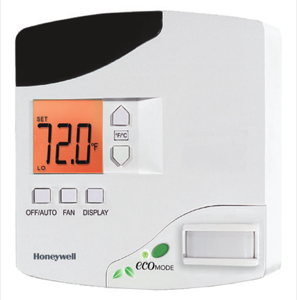
An INNCOM thermostat is not a home thermostat with a hotel logo on it. It is the room-level endpoint of an energy management system (EMS), and its whole job is to spend HVAC energy only when spending it improves the guest experience.
Two behaviors flow from that:
- Setpoint limiting. The thermostat is configured with a comfortable band, not an unlimited range. A guest may not be able to drive the room to an extreme because extremes cost disproportionate energy, stress the equipment, and often signal a comfort complaint that a few degrees will not actually fix.
- Setback (recovery). When the room reads as unoccupied, the system relaxes the setpoint toward an economy target, then recovers to the guest's comfort setting when it detects the guest again. Honeywell's own materials describe standalone occupancy-based control saving on the order of 10–25% of guestroom HVAC energy versus a traditional always-on thermostat, and integrated systems that add a door sensor and property-management-system (PMS) tie-in reaching considerably higher. Multiply that across every unrented and every temporarily empty room and it is the entire reason the system was purchased.
"Occupancy" is inferred, not measured directly. The two most common inputs are a passive infrared (PIR) motion sensor and a door contact. Simplistically: an opened door followed by no motion suggests the guest left; motion after entry suggests they are staying. Networked properties layer in PMS status so an unrented room can sit in a deeper setback than an occupied one. None of this is arbitrary. It is a chain of inferences, and understanding the chain is what lets you tune it instead of fighting it.
The legitimate tools: VIP and limited-energy-management modes
Here is where the forums are half-right. INNCOM platforms include modes that intentionally relax the energy logic for a specific room — commonly discussed as VIP mode or limited energy management (LEM).
The intent is a genuine comfort exception:
- A guest with a documented medical need for a stable, cooler room.
- A long-stay or high-value guest for whom you have decided the comfort is worth the energy.
- A room where the standard occupancy logic genuinely does not fit the use case.
When you place a room into a VIP or limited-energy-management state, you are deliberately widening the setpoint band and softening or suspending the occupancy-driven setbacks for that room, on your terms, with a record that you did it. Crucially, this is a grant, not a defeat. The room comes back into the energy program when the stay ends or when you decide it should. The energy cost is a decision you made with eyes open, not a leak you never see.
How that differs from a guest "hack"
A guest keypad sequence circulating online tries to force a similar relaxed state from the front of the thermostat, without your knowledge and without any expiry. The functional gap is not really about the button presses; it is about governance:
| VIP / LEM mode (engineer-granted) | Guest "override" | |
|---|---|---|
| Who decides | You, per room, per policy | The guest, silently |
| Visibility | Recorded / intentional | Invisible until the bill or a complaint |
| Expiry | Ends with the stay or on your action | Persists until someone notices |
| Cost owner | A cost you chose to accept | A cost you never budgeted |
There is also a moving-target reality worth knowing: keypad sequences that worked on older units frequently do nothing on current INNCOM firmware, which is exactly why the traveler forums are full of "it didn't work at this hotel" follow-ups. The sanctioned VIP/LEM path, by contrast, is a supported capability — it does not evaporate with a firmware update. The exact activation methods, code levels, and parameters are property- and model-specific; defer those to your INNCOM documentation or your Authorized Service Integrator (ASI) rather than to a forum.
Why bogus overrides quietly cost the hotel money
Two very different things get called "overriding the thermostat," and only one of them is a comfort win.
A legitimate exception costs you the incremental energy of one deliberately-comfortable room. Bounded, chosen, reversible.
A defeated sensor costs you the setback on that room for as long as the defeat lasts — which is often the whole stay, and sometimes past checkout if housekeeping doesn't reset it. The classic move the forums describe is blocking the PIR (a piece of tape, a folded towel over the sensor) so the room never reads as empty and never sets back, even while the guest is out all day. One room doing that is noise. A pattern of it across a floor is the 10–25% you were banking on quietly draining away, and you will only see it as a fuzzy uptick in HVAC runtime with no obvious cause.
The insidious part: a defeated sensor and a genuinely broken sensor produce the same symptom — a room that will not set back. Which is why the right response to "this room never goes to economy" is not to shrug or to lock the guest out, but to figure out which of the two it is.
Actually tunable vs. a real defect
Before you touch anything, sort the complaint into one of three buckets.
Tunable behavior (this is a settings conversation)
- The comfort band feels too narrow for your climate or guest mix.
- Setback engages too aggressively, so guests return to a room that takes too long to recover.
- Recovery is too slow after occupancy is detected.
- A specific room legitimately warrants a VIP/LEM exception.
None of these are faults. They are logic parameters — setpoint limits, occupancy timeout, setback depth, recovery behavior — and they are meant to be tuned to your building. That tuning is exactly the ASI's job.
A real defect (this is a service call, not a settings change)
- Stuck or miswired door contact. If the system thinks the door is permanently open (or permanently closed), its occupancy inference is corrupted and the room may refuse to set back or may set back at the wrong times. This is hardware, not preference.
- Blocked, failed, or obstructed PIR. A sensor covered by the guest, by furniture, by a curtain, or simply failed will misread occupancy. Check for physical obstruction first — it is the single most common "the thermostat is broken" that is neither broken nor a hack.
- A unit that ignores its programming entirely. Consistent with a firmware, wiring, or hardware issue and worth escalating.
The tell
If one room misbehaves, suspect that room's hardware — contact, PIR, wiring. If every room in a wing misbehaves the same way, suspect the logic or the network, and get your ASI on it before you start opening thermostats.
When to call an ASI instead of defeating the logic
The worst outcome here is an engineer who, under pressure from a guest, learns a "hack" and starts applying it as standard practice — quietly dismantling the energy program one room at a time to make complaints go away. That trades a system you paid for against a problem that was almost always tunable.
Call your Authorized Service Integrator when:
- Comfort complaints are frequent enough to suggest your bands or setback timing need rebalancing for real occupancy patterns.
- You want VIP/LEM available as a clean, documented front-desk workflow instead of an improvised trick.
- You suspect defeated or failed sensors and want the occupancy logic verified end to end.
- You are about to change setpoint limits, occupancy behavior, or network/PMS integration and want it done without collateral damage to the savings you are reporting.
An ASI can tune the logic so the legitimate comfort cases are handled by design — which is the durable fix. Defeating the sensor is not a fix; it is a slow, invisible leak you will pay for on a bill you can't itemize.
FAQ
How do I override the thermostat in my hotel room to make it colder?
The mode you are describing is a real feature (often called VIP or limited-energy-management mode), but on a managed property it is meant to be enabled by hotel engineering for a genuine comfort exception, not activated silently. Ask the front desk. Many older keypad sequences also simply don't work on current INNCOM firmware.
A guest quoted an INNCOM "VIP mode hack" at my front desk. Is it real?
The mode is real; the framing is off. VIP / limited-energy-management is a legitimate, engineer-granted state you can offer deliberately. The difference between a grant and a "hack" is governance — visibility, an expiry, and an owned cost — not the button presses.
One room never sets back to economy. Is it a hack or a fault?
Both produce the same symptom, so investigate rather than assume. Check the PIR for obstruction (tape, towel, furniture) and check the door contact for a stuck or miswired state. A single misbehaving room usually points to that room's hardware; a whole wing points to logic or network.
Why not just widen the setpoint range and disable setback everywhere so guests stop complaining?
Because setback and occupancy logic are the entire reason the system saves 10–25%+ on guestroom HVAC. Turning it off globally to silence occasional complaints trades a large, invisible cost against a small, tunable one. Rebalance the bands and timing instead — that is an ASI conversation.
Can I just learn the guest button sequence and use it as our standard workaround?
Strongly discouraged. It dismantles your energy program one room at a time, leaves no record, and may break on the next firmware update. Use the sanctioned VIP/LEM workflow so exceptions are intentional, reversible, and accounted for.
Call to action
If guests are overriding your INNCOM thermostats — or if you are not sure whether a room is defeated, defective, or just misconfigured — talk to Howe Sound Solutions, your Canadian Honeywell INNCOM Authorized Service Integrator. We will help you tell a tunable setting from a real defect, stand up VIP / limited-energy-management as a clean front-desk workflow, and tune the occupancy logic so comfort exceptions are handled by design instead of by workaround.
Reach us through the Howe Sound Solutions contact page, or contact your ASI to schedule a review. Specific activation steps, code levels, and parameters vary by model and firmware — bring those to your INNCOM documentation or your ASI rather than to a forum.
Trained INNCOM technicians, Canada-wide, with quote-first parts.
Book a site assessment Request a parts quoteRelated: e7 field guide · e528 troubleshooting guide · INNCOM service in Canada · parts catalogue · customer platform · contact us