
INNCOM e528: Error Codes, Lockouts, and Service Mode — A Field Guide for Hotel Engineers
If you maintain a hotel built or retrofitted in the last fifteen years, odds are good there's an INNCOM e528 on the wall of every guestroom. It's a workhorse — a wired, five-relay DDC thermostat that quietly runs the fan coil, watches the door switch and motion sensor, and reports back to the property's energy management server. When it works, nobody thinks about it. When it doesn't, you're the one standing in room 412 at 2 a.m. with a guest complaint and a display that either says something cryptic or says nothing at all.
This guide is for hotel chief engineers and maintenance techs. It won't replace your property's as-built documentation — nothing does — but it will help you figure out *what kind* of problem you have before you start pulling the stat off the wall or calling for service.
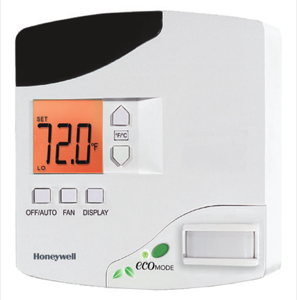
How the e528 tells you something is wrong
The e528 doesn't have a diagnostic screen the way a modern touchscreen stat does. It communicates trouble in four basic ways:
- Codes on the LCD. Short alphanumeric displays (the best known being E51 when you attempt to enter a locked service mode) that appear in place of, or alongside, the temperature.
- Behavior you didn't ask for. Setpoints that snap back, fans that won't shut off, temperature ranges the guest can't get past. This is usually the EMS doing its job — not a fault.
- Silence. A blank display, or a room that stops reporting to INNcontrol even though the stat looks fine on the wall.
- What the server sees. If your property runs INNcontrol 3 or 5, the supervisor software is often the first place a failing room shows up — offline flags, stale data, or alarm reports — before anyone in the room notices anything.
The trick at 2 a.m. is sorting *device faults* from *system behavior*. Roughly half the "broken thermostat" calls I've run were a thermostat doing exactly what the energy management system told it to do.
Common symptoms, likely causes, first response
| Symptom | Likely cause | First response |
|---|---|---|
| Display completely blank | Loss of supply power — tripped breaker, loose 10-pin harness, failed transformer on 24 VAC models | Confirm the FCU breaker; check the Molex harness seats firmly on the stat's back plate |
| Displays E51 when entering service mode | Service mode is locked out (deliberate, property-wide security setting) | Don't fight it — the ES-1 hardware key or ASI support is required to unlock |
| Setpoint keeps drifting back after the guest changes it | Occupancy-based setback: PIR sees no motion, or door/window switch reports open | Verify the door/window contact isn't stuck open and the PIR lens isn't blocked or painted over |
| Guest "can't set it below 68" | Occupied temperature control limits set by the property | This is configuration, not a fault; changing limits is a management decision, not a room-level fix |
| Fan runs continuously, ignores mode | Temperature protection override — room air has drifted past the protection band (roughly the low-50s / high-80s °F, property-dependent) | Find out why the room got that hot/cold: failed valve, dead FCU, open balcony door |
| Room temperature reads wrong | Poor mounting location (sunlight, supply-air draft, not flush to wall) or a faulty external thermistor | Check what's near the stat; if an external probe is fitted, inspect its wiring first |
| Room offline in INNcontrol, stat works locally | Network address, RF channel, or PAN ID mismatch; RS485 wiring fault; dead edge router or floor bridge | Check whether *neighbouring* rooms are also offline before touching the stat |
| Erratic behavior after a stat swap | Wrong or reversed low-voltage harness connections, or HVAC parameters not configured for the installed equipment | Power down, verify harness orientation against the as-built wiring diagram |
Service mode: what it is, when to use it, when not to
Every e528 has a hidden service parameter mode — a technician-level menu entered with a specific multi-button hold sequence from the front panel (it's in your e528 quick-start documentation; the display confirms entry by showing a parameter label such as rid). Inside, you can view and edit the parameters that define how this particular stat behaves: the network address (held across three parameters and usually matching the room number), RF channel and PAN ID on wireless installations, and the HVAC output configuration that tells the relays what kind of fan coil or heat pump they're driving.
Use service mode when:
- You've swapped a thermostat and need to set the room's network address so INNcontrol can find it again.
- You're verifying network connectivity — the built-in tests can confirm the stat is actually talking to the server, and exercise the PIR and door/window inputs so you can prove a sensor is dead versus a config problem.
- You need to confirm the RF channel and PAN ID match the room gateway after RF changes on the floor.
Do not use service mode to:
- "Fix" guest comfort complaints by editing HVAC control parameters you don't fully understand. Those parameters were commissioned against your specific fan coil equipment. One wrong value and the stat can short-cycle a compressor or run heat and cool valves against each other.
- Copy settings between rooms by eye. If your property has an ES-1 flash module, use it — it exists precisely so a verified "golden" configuration can be cloned instead of keyed in by hand.
- Bypass energy management because a guest asked. There are legitimate per-room comfort overrides (VIP/limited-EMS modes) designed for that; use those, and log it.
Write down every parameter you change, and the value it had before. Future-you will be grateful.
Lockout scenarios
Three distinct things get called "lockout" on this platform, and they need different responses:
Service mode lockout (the E51 situation). Many properties lock the service menu so that curious guests — and the internet is full of "override your hotel thermostat" tutorials — can't reconfigure a stat. If your entry attempt returns E51, the stat is functioning correctly; it's telling you it needs the ES-1 key. If your property doesn't have one on site, that's a call to your INNCOM documentation holder or an Authorized Service Integrator. Don't cycle power hoping it clears; it won't.
Setpoint limit "lockout." Guests report the stat as broken because it won't go below the occupied low limit or above the high limit. This is the EMS policy your property chose at commissioning. It's adjustable — but system-wide, deliberately, through INNcontrol or an ASI, not by prying at individual stats.
Protection-band override. If room air drifts outside the temperature protection limits, the e528 seizes control: fan on, valves modulating, until the room is back inside the safe band. Guests describe this as "the thermostat has a mind of its own." It's protecting your building from frozen pipes and mold. Fix the root cause — usually a failed valve, a dead compressor, or an open slider in January.
Is it the thermostat, the network, or INNcontrol?
Before replacing hardware, localize the fault:
It's probably the thermostat if the display is dead with confirmed power, a sensor test fails audibly in service mode, the temperature reading is wildly wrong with no environmental explanation, or the relays won't drive a fan coil that runs fine when jumpered manually.
It's probably the network if the stat controls the room perfectly but INNcontrol shows it offline — especially if *several rooms in a cluster* dropped together. On wired CINET/RS485 systems, look for a physical wiring fault or a dead segment. On RF systems, look at the room gateway, the PAN/channel settings, and the floor bridge or edge router feeding that zone. One offline room is a stat problem; a whole wing offline is an infrastructure problem.
It's probably INNcontrol or the head end if entire floors or the whole property went stale at once, or problems started right after a server change, network switch replacement, or IT maintenance window. The stats will keep controlling their rooms standalone — that's by design — but you've lost central visibility.
Before you call for service
A service call goes twice as fast when you can provide:
1. Exact model and generation. The e528 shipped in 3G and 4G hardware with different headers and harnesses — a replacement that doesn't match your wiring vintage needs an adapter, not just a swap.
2. Room numbers affected, and whether they cluster by floor, riser, or RF zone.
3. What the display shows — codes, blanks, or normal readout.
4. What INNcontrol shows for those rooms, if you have head-end access.
5. What changed recently — renovations, Wi-Fi access point installs (2.4 GHz congestion is real), electrical work, server maintenance.
6. Your as-built wiring diagrams and room list if you can locate them. If you can't, say so — an ASI can work without them, but should know going in.
Get help from people who work on these every week
Howe Sound Solutions is a Canadian Honeywell INNCOM Authorized Service Integrator. Our technicians are factory-trained on the e528 and the systems around it — INNcontrol, room gateways, CINET and RF networks — and we support properties Canada-wide. We also supply replacement INNCOM parts with compatibility verification before shipping, so you're not discovering a 3G/4G harness mismatch on a ladder at midnight. If a room, a floor, or a whole property is misbehaving, contact us and bring the list above.
FAQ
Why is my INNCOM e528 display blank?
Almost always power: a tripped FCU breaker, a loose 10-pin harness on the back of the stat, or a failed 24 VAC transformer. The e528 is line- or low-voltage powered depending on model, so confirm which you have before probing. If power checks good at the harness and the display stays dark, the unit itself has likely failed.
What does E51 mean on an INNCOM thermostat?
You tried to enter service mode on a stat that's locked. It's a security feature, not a fault. Unlocking requires the ES-1 hardware key or ASI assistance — there's no button sequence or power-cycle that clears it.
How do I reset an INNCOM e528 after replacing it?
Physical swap is the easy part. The new stat needs the room's network address set in service parameters, plus HVAC configuration matching your fan coil. If your property has an ES-1 module with a golden config, use it. Then verify the room reports correctly in INNcontrol before you leave.
Why won't the thermostat hold the temperature the guest sets?
Occupancy setback. When the PIR sees no motion or the door/window contact reports open, the EMS relaxes the setpoint to save energy. If it's happening with a guest in the room, test the sensors — a stuck window contact is the classic culprit.
Can I change the temperature limits on INNCOM thermostats myself?
The occupied low/high limits are system configuration, set at commissioning. Changing them property-wide is done through the head end and is best handled with your INNCOM documentation or an ASI — the limits interact with setback bands and protection limits, and inconsistent per-room edits create exactly the kind of ghost complaints that are miserable to chase later.
Trained INNCOM technicians, Canada-wide, with quote-first parts.
Book a site assessmentRelated: e7 vs e528 comparison · discontinued INNCOM parts guide · e528 replacement & repair · parts catalogue · customer platform · contact us