
Your INNCOM system, watched — alarms to email, 24/7
An INNCOM system is quietly telling you things all day: a room that dropped offline, an HVAC fault building toward a guest complaint, a door contact that stopped reporting, energy behaviour drifting from what was commissioned. The problem is that on most properties, nobody is looking at the screen when it matters — the dashboard lives on a workstation in the back office, and the first "alert" is a guest at the front desk.
Our monitoring service closes that gap: we watch, and your engineering team gets an email when something actually needs a human. No new hardware in the room, no rip and replace — it works with the INNCOM system you already own.
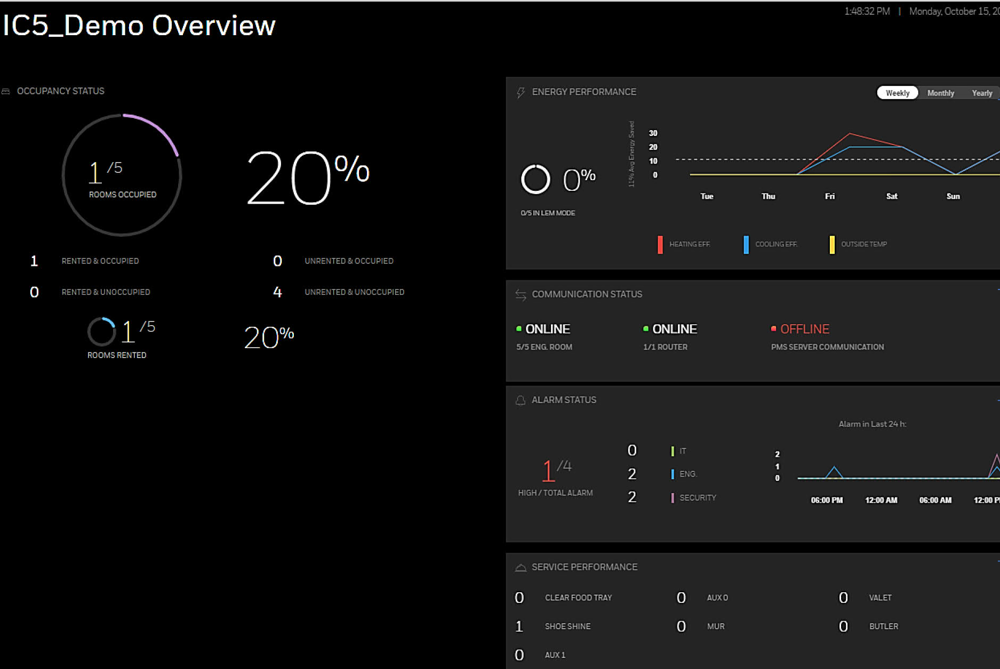
What we watch
- Room and system alarms — high/low room temperature, HVAC faults, and the alarm classes your property flags as guest-affecting.
- Offline rooms — a room that stops reporting is invisible to energy management and to you; we treat it as an event, not a surprise for the next site visit.
- Communication health — edge routers, floor bridges, and server connectivity, so a cluster of "offline rooms" gets diagnosed as the network issue it usually is.
- Energy behaviour — setback patterns that stop looking like the commissioning intent, flagged for review before the utility bill notices.
Running INNcontrol 3? We built our own bridge for you
Here's the honest gap in the market: modern notification workflows assume a modern head end, and a lot of good Canadian properties still run INNcontrol 3. Rather than telling those owners "upgrade first," we built our own solution in-house: a small, dedicated alarm-to-email bridge that listens to the alarm feed an IC3-generation system already produces and turns it into clean, immediate email notifications to your engineering team — with de-duplication so a persistent fault doesn't bury your inbox.
- No IC5 upgrade required — it meets your system where it is today.
- No changes to your INNCOM configuration — it listens; it doesn't touch.
- Built and supported by us — developed by Howe Sound Solutions, tested hard, and deployed per-property by the same technicians who service your rooms.
If you've ever said "the system knew, but nobody told us" — this is the fix, and pairing it with an IC3 → INNcontrol 5 upgrade plan later is completely natural: the notification habit carries over.
How it works
1. Baseline. A technician reviews your system — head-end generation, alarm configuration, network layout — and agrees with you on what is alert-worthy versus noise.
2. Connect. IC5 properties: we monitor through the platform's own reporting — our IC5 dashboard troubleshooting guide shows what those screens can tell you. IC3 properties: we deploy our alarm-to-email bridge alongside your existing server.
3. Notify. Alerts go to the inboxes you choose — engineering, the chief, the GM for critical items — with a plain-language line of what happened and where.
4. Review. Recurring offenders (the room that flaps weekly, the sensor that drifts) get rolled into a periodic summary, because patterns are where the real fixes live.
Why this beats "someone checks the dashboard"
Dashboards are pull; problems are push. A screen in the engineering office only helps during the shift, and only if the tab is open. Email lands on every phone your team already carries, at 2 p.m. or 2 a.m. The measure of a monitoring service is simple: how often does your team hear it from the system before they hear it from a guest?
Frequently asked questions
Does this require new wiring or in-room hardware?
No. Monitoring works with the devices and network you already have. If a baseline review turns up genuinely broken hardware, we'll tell you — that's a repair conversation, not a monitoring one.
We're on INNcontrol 3 — do we have to upgrade first?
No. That's exactly why we built the IC3 alarm-to-email bridge. Upgrading to INNcontrol 5 has real benefits, but notifications shouldn't have to wait for a capital project.
Who receives the alerts?
Whoever you choose — typically engineering plus an escalation contact for critical items. The routing is agreed at baseline and adjusted whenever you like.
Is this included in the support plans?
Monitoring pairs naturally with our service & support plans — ask us to quote them together.
Stop finding out from guests
Tell us your head-end generation (IC3 or IC5) and property size, and we'll propose a monitoring setup — email us or start a site assessment.